概要
前に自作した Chrome 拡張の紹介記事を書いたが、そのアプリに API Key の生成 と API Key 経由での Web ページ登録 API を追加した。
実装には Supabase Edge Functions を採用。設計と実装手順を残す。
PR
自作した Chrome 拡張
モチベーション
MarkyLinky は Web ページを保存/削除し、Markdown のリンクに変換してコピーできる Chrome 拡張。ログインすれば別ブラウザでも共有可能。仕事で技術記事のストック→共有に使っている。共有後すぐ削除できる UX が便利。
課題は Chrome拡張機能前提 な点。iPhone/Android で閲覧中にワンステップで保存できない。
そこで API Key の生成 + API Key 経由登録 と、以前書いた ショートカット経由で直接 API 実行 を組み合わせ、iPhone からもワンステップ保存を狙った。
本記事ではその中核である 「API Key の生成」と「API Key 経由登録」 を Supabase Edge Functions で実装した部分に絞って解説。
Supabase Edge Functions
Supabase が提供するサーバーレス関数。ランタイムは Supabase Edge Runtime(Deno 互換)。今回は Auth と DB を Supabase に寄せているため、API も同じ基盤で統一。Supabase CLI でローカル検証が容易。
設計
作る API は 2 つ。
- API Key 生成 API
- Supabase Auth で認証済みのときのみ実行可能
db: api_tokensに ユーザーID と トークン を保存- トークンは重複なしのランダム文字列
- API Key 経由でアイテム登録する API
- 認証不要(トークン + URL を受け付け)
- 受け取ったトークンから
api_tokensを引いてユーザーを特定しitemsに登録 - URL から title と favicon URL を解析して保存
実装
Supabase のローカル環境構築
プロジェクト初期化。
supabase init
スタック起動(Postgres, Kong, Studio などが立ち上がる)。
supabase start
Studio へのアクセス(出力ログの URL を開く)。
open http://127.0.0.1:54323
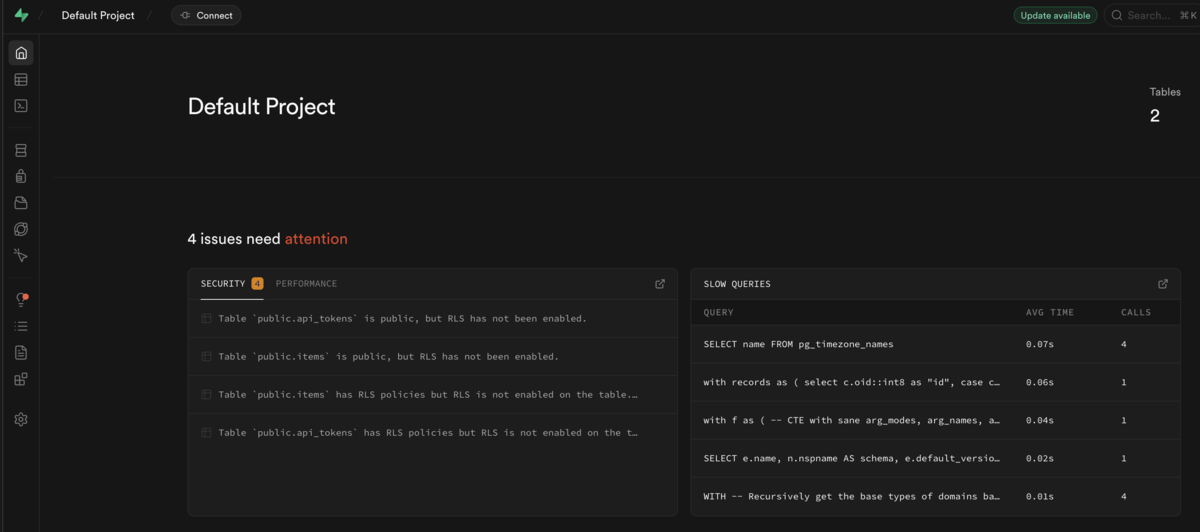
マイグレーション作成
マイグレーション雛形を作成。
supabase migration new api_tokens
生成物。
supabase
  └── migrations
      └── 20251215140600_api_tokens.sql
api_tokens テーブルと RLS ポリシーを定義。
■ supabase/migrations/20251215140600_api_tokens.sql
create table if not exists api_tokens (
  id bigint primary key generated always as identity,
  uuid uuid not null,
  title text not null,
  token text not null unique,
  created timestamptz default now()
);

CREATE POLICY "Users can select their own api tokens"
ON public.api_tokens
FOR SELECT
USING (auth.uid() = uuid);

CREATE POLICY "Users can insert their own api tokens"
ON public.api_tokens
FOR INSERT
WITH CHECK (auth.uid() = uuid);

CREATE POLICY "Users can update their own api tokens"
ON public.api_tokens
FOR UPDATE
WITH CHECK (auth.uid() = uuid);

CREATE POLICY "Users can delete their own api tokens"
ON public.api_tokens
FOR DELETE
USING (auth.uid() = uuid);
ローカルに反映。
supabase migration up
Studio でテーブル作成を確認。
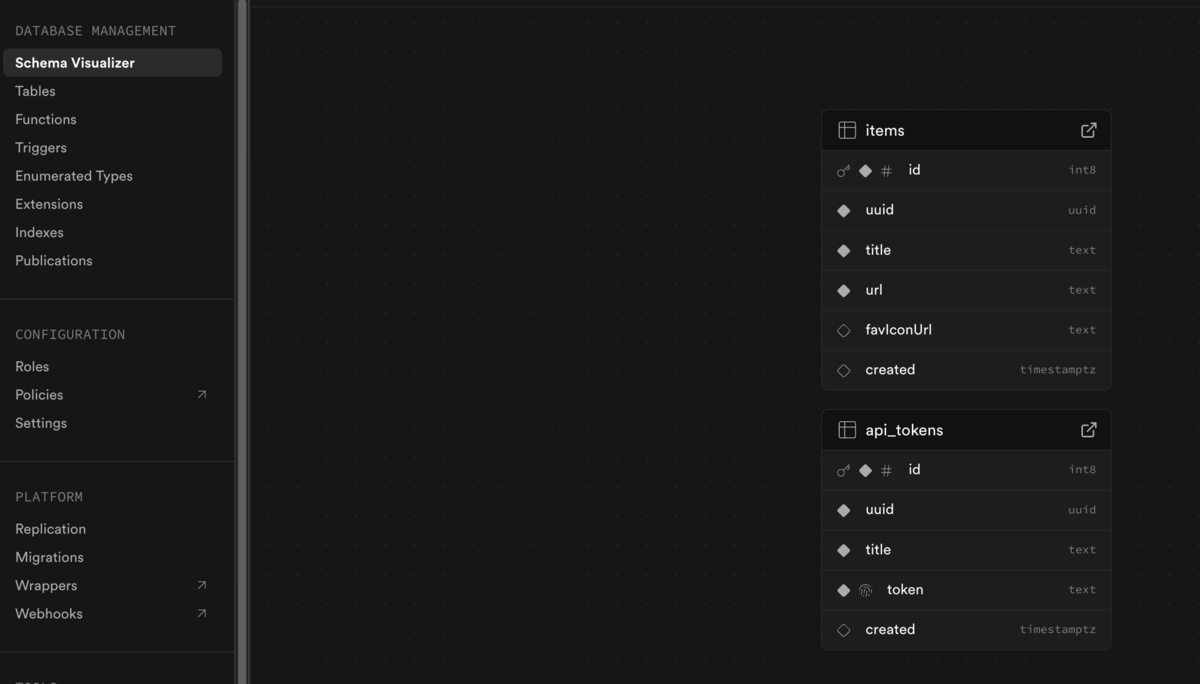
本番へ反映。
supabase db push
型の自動生成。
supabase gen types typescript --local > schema.ts
Edge Functions(API Key 生成)
関数雛形を作成。
supabase functions new create-token
構成。
supabase
  └── functions
        └── create-token
            ├── deno.json
            └── index.ts
index.ts に実装。ユニークキー生成(Base64URL)、重複時リトライ、Auth ヘッダー連携を含む。
■ supabase/functions/create-token/index.ts
import "jsr:@supabase/functions-js/edge-runtime.d.ts";
import { createClient } from "npm:@supabase/supabase-js@2";

const corsHeaders = {
  "Access-Control-Allow-Origin": "*",
  "Access-Control-Allow-Headers":
    "authorization, x-client-info, apikey, content-type",
};

function toBase64Url(bytes: Uint8Array): string {
  const b64 = btoa(String.fromCharCode(...bytes));
  return b64.replaceAll("+", "-").replaceAll("/", "_").replaceAll("=", "");
}

function generateApiKey(): string {
  const bytes = new Uint8Array(32);
  crypto.getRandomValues(bytes);
  return toBase64Url(bytes);
}

function isPostgrestError(err: unknown): err is {
  code?: string;
  message?: string;
  details?: string;
  hint?: string;
} {
  return typeof err === "object" && err !== null && "message" in err;
}

function getErrorMessage(err: unknown): string {
  if (isPostgrestError(err) && typeof err.message === "string") {
    return err.message;
  }
  if (err instanceof Error) return err.message;
  return String(err);
}

function isUniqueViolation(err: unknown): boolean {
  return isPostgrestError(err) && err.code === "23505";
}

Deno.serve(async (req) => {
  if (req.method === "OPTIONS") {
    return new Response("ok", { headers: corsHeaders });
  }

  const authorizationHeader = req.headers.get("Authorization");
  if (!authorizationHeader) {
    return new Response("Unauthorized", { status: 401, headers: corsHeaders });
  }
  const token = authorizationHeader.replace("Bearer ", "");

  try {
    const { title } = await req.json();

    if (!title) {
      return new Response(
        JSON.stringify({
          error: "title is required and must be a non-empty string",
        }),
        {
          headers: { ...corsHeaders, "Content-Type": "application/json" },
          status: 400,
        },
      );
    }

    const supabaseClient = createClient(
      Deno.env.get("SUPABASE_URL") ?? "",
      Deno.env.get("SUPABASE_ANON_KEY") ?? "",
      {
        global: { headers: { Authorization: authorizationHeader } },
      },
    );

    const { data: userData, error: userError } = await supabaseClient.auth
      .getUser(token);
    if (userError) throw userError;

    const user = userData?.user;
    if (!user) {
      return new Response("Unauthorized", {
        status: 401,
        headers: corsHeaders,
      });
    }

    const maxRetries = 5;

    for (let i = 0; i < maxRetries; i++) {
      const apiKey = generateApiKey();

      try {
        const { error } = await supabaseClient
          .from("api_tokens")
          .insert({
            uuid: user.id,
            title,
            token: apiKey,
          })
          .select("token")
          .single();

        if (error) throw error;

        return new Response(
          JSON.stringify({ token: apiKey }),
          {
            headers: { ...corsHeaders, "Content-Type": "application/json" },
            status: 200,
          },
        );
      } catch (err) {
        if (isUniqueViolation(err)) continue;
        return new Response(
          JSON.stringify({ error: getErrorMessage(err) }),
          {
            headers: { ...corsHeaders, "Content-Type": "application/json" },
            status: 400,
          },
        );
      }
    }

    return new Response(
      JSON.stringify({ error: "could_not_generate_unique_key" }),
      {
        headers: { ...corsHeaders, "Content-Type": "application/json" },
        status: 500,
      },
    );
  } catch (error) {
    return new Response(
      JSON.stringify({ error: getErrorMessage(error) }),
      {
        headers: { ...corsHeaders, "Content-Type": "application/json" },
        status: 400,
      },
    );
  }
});
ローカル起動。
supabase functions serve --no-verify-jwt
Studio から認証済みユーザーを作成し、アクセストークンを取得。
USER=xxxxx PASSWORD=xxxxx
ACCESS_TOKEN=$(curl -s -X POST "$(supabase status --output json | jq -r '.API_URL')/auth/v1/token?grant_type=password"   -H "apikey: $(supabase status --output json | jq -r '.ANON_KEY')"   -H "Content-Type: application/json"   -d '{"email":"'"${USER}"'","password":"'"${PASSWORD}"'"}' | jq -r '.access_token')

curl -H "Authorization: Bearer $ACCESS_TOKEN"   "$(supabase status --output json | jq -r '.API_URL')/functions/v1/create-token"   -H "Content-Type: application/json"   -d '{"title":"test"}'
テーブルにレコードが入ることを確認。
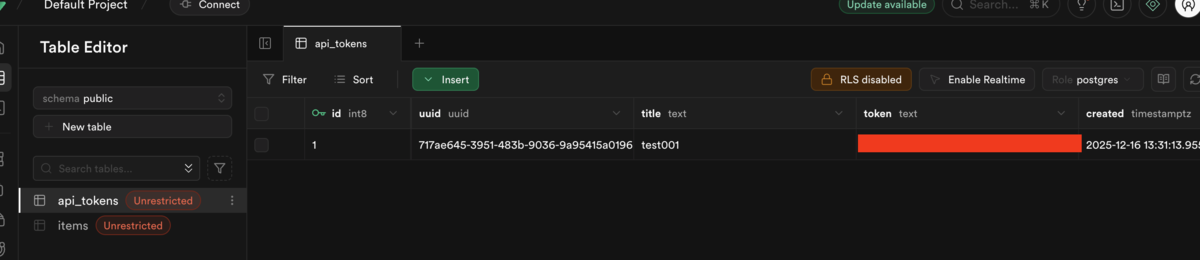
Edge Functions(API Key 経由登録)
雛形。
supabase functions new create-item
api_tokens を引き、URL のメタを解析して items に登録する関数を実装。プライベートネットやメタデータエンドポイント等への SSRF を簡易ブロック。
■ create-item の実装例
supabase/functions/create-item/index.ts
import "jsr:@supabase/functions-js/edge-runtime.d.ts"; import { createClient } from "npm:@supabase/supabase-js@2"; function isHttpUrl(input: string): boolean { try { const u = new URL(input); return u.protocol === "http:" || u.protocol === "https:"; } catch { return false; } } function isBlockedHost(hostname: string): boolean { const h = hostname.toLowerCase(); if (h === "localhost" || h.endsWith(".localhost")) return true; if (h === "127.0.0.1" || h === "0.0.0.0") return true; if (h.startsWith("10.")) return true; if (h.startsWith("192.168.")) return true; if (h.startsWith("172.")) { const parts = h.split("."); const second = Number(parts[1]); if (!Number.isNaN(second) && second >= 16 && second <= 31) return true; } if (h === "::1") return true; if (h === "169.254.169.254") return true; return false; } function extractTitle(html: string): string | null { const m = html.match(/<title[^>]*>([\s\S]*?)<\/title>/i); if (!m) return null; return decodeHtmlEntities(m[1].trim()).slice(0, 200); } function extractFaviconHref(html: string): string | null { const relPriority = [ "icon", "shortcut icon", "apple-touch-icon", "apple-touch-icon-precomposed", ]; const links = [...html.matchAll(/<link\b[^>]*>/gi)].map((m) => m[0]); type Candidate = { rel: string; href: string }; const candidates: Candidate[] = []; for (const tag of links) { const rel = (tag.match(/\brel\s*=\s*["']([^"']+)["']/i)?.[1] ?? "") .toLowerCase().trim(); const href = (tag.match(/\bhref\s*=\s*["']([^"']+)["']/i)?.[1] ?? "") .trim(); if (!rel || !href) continue; if (rel.includes("icon")) { candidates.push({ rel, href }); continue; } if (relPriority.includes(rel)) { candidates.push({ rel, href }); continue; } } candidates.sort((a, b) => { const ai = relPriority.indexOf(a.rel); const bi = relPriority.indexOf(b.rel); return (ai === -1 ? 999 : ai) - (bi === -1 ? 999 : bi); }); return candidates[0]?.href ?? null; } function resolveUrl(baseUrl: string, maybeRelative: string): string { try { return new URL(maybeRelative, baseUrl).toString(); } catch { return maybeRelative; } } function decodeHtmlEntities(s: string): string { return s .replaceAll("&", "&") .replaceAll("<", "<") .replaceAll(">", ">") .replaceAll(""", '"') .replaceAll("'", "'"); } async function fetchHtmlWithLimits( url: string, timeoutMs = 8000, maxBytes = 512_000, ) { const controller = new AbortController(); const t = setTimeout(() => controller.abort(), timeoutMs); try { const res = await fetch(url, { signal: controller.signal, redirect: "follow", headers: { "User-Agent": "meta-extractor/1.0", "Accept": "text/html,application/xhtml+xml", }, }); const finalUrl = res.url; const contentType = res.headers.get("content-type") ?? ""; if (!contentType.toLowerCase().includes("text/html")) { throw new Error(`Not HTML content-type: ${contentType}`); } const reader = res.body?.getReader(); if (!reader) throw new Error("No response body"); const chunks: Uint8Array[] = []; let total = 0; while (true) { const { value, done } = await reader.read(); if (done) break; if (!value) continue; total += value.byteLength; if (total > maxBytes) throw new Error(`HTML too large (> ${maxBytes} bytes)`); chunks.push(value); } const all = new Uint8Array(total); let offset = 0; for (const c of chunks) { all.set(c, offset); offset += c.byteLength; } const html = new TextDecoder().decode(all); return { html, finalUrl }; } finally { clearTimeout(t); } } const corsHeaders = { "Access-Control-Allow-Origin": "*", "Access-Control-Allow-Headers": "authorization, x-client-info, apikey, content-type", }; Deno.serve(async (req) => { const requestUrl = new URL(req.url); const url = requestUrl.searchParams.get("url"); const token = requestUrl.searchParams.get("token"); if (!url || !token) { return new Response( JSON.stringify({ error: "url and token are required" }), { headers: { "Content-Type": "application/json" } }, ); } if (!isHttpUrl(url)) { return new Response( JSON.stringify({ error: "url is required (http/https)" }), { headers: { "Content-Type": "application/json" } }, ); } const u = new URL(url); if (isBlockedHost(u.hostname)) { return new Response(JSON.stringify({ error: "blocked host" }), { headers: { "Content-Type": "application/json" }, }); } const supabaseClient = createClient( Deno.env.get("SUPABASE_URL") ?? "", Deno.env.get("SUPABASE_SERVICE_ROLE_KEY") ?? "", ); try { const { data, error } = await supabaseClient .from("api_tokens") .select("*") .eq("token", token) .single(); if (error) throw error; if (!data) throw new Error("token not found"); const { html, finalUrl } = await fetchHtmlWithLimits(url); const title = extractTitle(html) ?? ""; const faviconHref = extractFaviconHref(html); const favIconUrl = faviconHref ? resolveUrl(finalUrl, faviconHref) : resolveUrl(finalUrl, "/favicon.ico"); const { error: itemError } = await supabaseClient.from("items").insert({ uuid: data.uuid, url, title, favIconUrl, }); if (itemError) throw itemError; return new Response( JSON.stringify({ title, favIconUrl }), { headers: { ...corsHeaders, "Content-Type": "application/json" }, status: 200, }, ); } catch (error: any) { return new Response( JSON.stringify({ error: String(error?.message ?? error) }), { headers: { ...corsHeaders, "Content-Type": "application/json" }, status: 400, }, ); } });
動作確認。
curl --location 'http://127.0.0.1:54321/functions/v1/create-item?url=https%3A%2F%2Fgithub.com%2Fwheatandcat%2FMarkyLinky%2Fissues%2F29&token=*****'
想定レスポンス。
{
  "title": "APIキーの生成と登録のAPIの仕組みを作成 · Issue #29 · wheatandcat/MarkyLinky · GitHub",
  "favIconUrl": "https://github.githubassets.com/favicons/favicon.svg"
}
デプロイ。
supabase functions deploy create-token
supabase functions deploy --no-verify-jwt create-item  # API Key 経由で叩くため --no-verify-jwt を付与
まとめ
- Supabase はローカル構築が簡単で、Auth/DB/Functions を一体で扱える
- Edge Functions で API Key 生成 と Key 経由登録 を最小構成で実装できた
